





EA Sports FC 26 Evolutions Explained: How EVOs Upgrade Ultimate Team Players
 EA Sports
Evolutions in Ultimate Team for EA Sports FC 26 allow players to upgrade their cards, whether that means pushing already elite stars even further or transforming bronze and silver favorites into powerful 80+ rated performers. With EVOs in FC 26, squad building becomes more flexible than ever, and many Evolutions are available for free. While upgrading cards requires completing matches and objectives, the rewards easily justify the time invested.
Once an Evolution is applied, the player card becomes untradeable. This decision is permanent, so using EVOs on high-value cards should be considered carefully if there is any intention to sell them later.
How Evolutions Work in FC 26
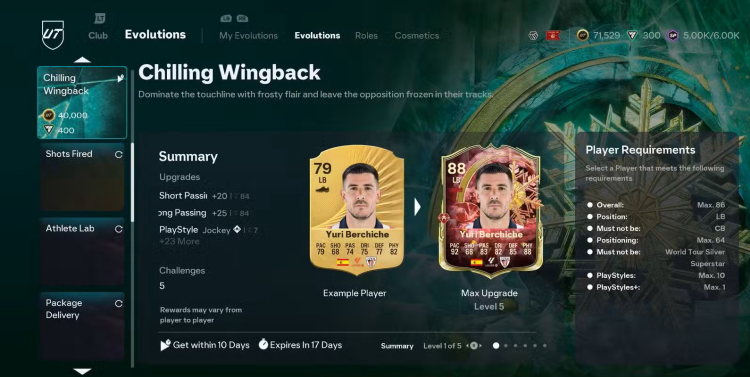
The Evolutions menu can be found by navigating to Club → Evolutions, located to the right of the Squad tab. From there, players can browse all currently available EVOs. Some require Coins or FC Points, while others cost nothing. New Evolutions are added weekly, with stronger options appearing as the real football season progresses.
EVO Requirements
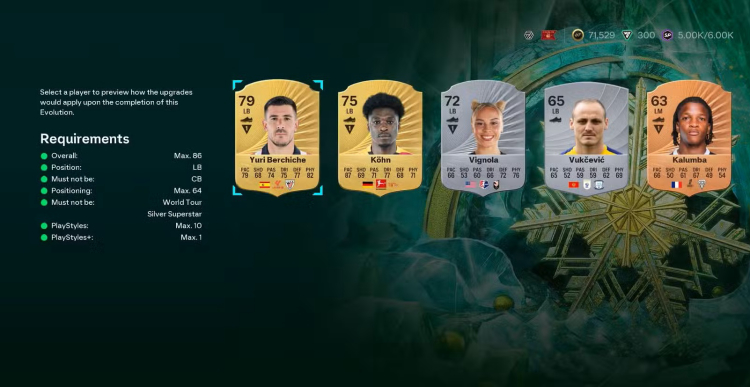
Each Evolution comes with specific eligibility requirements. Player cards may need to:
- Be below a certain overall rating
- Play a specific position
- Exclude a specific position
- Have a limited number of PlayStyles
Selecting an EVO displays a list of all eligible cards. After choosing a player, every upgrade stage can be previewed in advance, including stat boosts, new PlayStyles, and added positions.
EVOs also have separate deadlines for claiming and completing them. For example, an Evolution may need to be claimed within 24 hours, while allowing a full week to finish the objectives.
After confirming an EVO—sometimes requiring Coins or FC Points—the card will not upgrade immediately. Objectives must first be completed to unlock each upgrade stage.
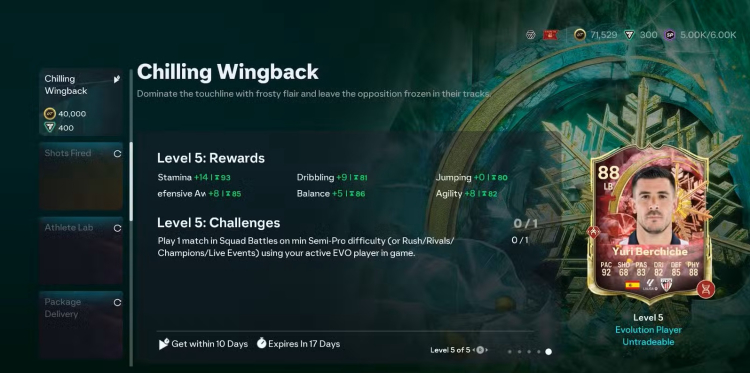
Player cards can receive multiple Evolutions over time, but only one Evolution can be active at a time.
Completing Objectives to Level Up Evolutions
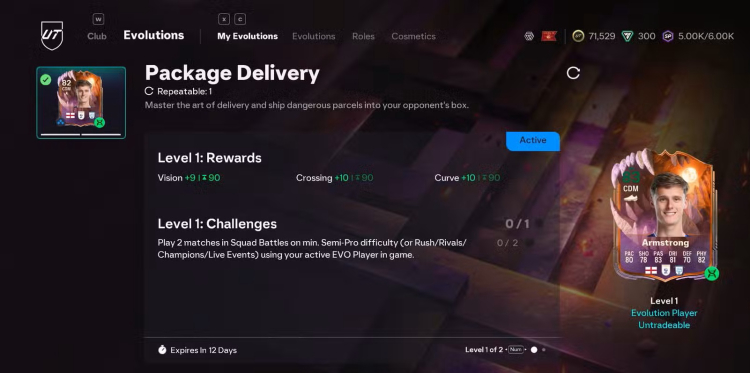
Once an Evolution is assigned, objectives become available under the My Evolutions tab. Only Active EVO players can progress, and these slots are filled automatically. In the squad view, Active EVO players are marked with a green circle on their card.
Most players can have two Active Evolutions simultaneously. Owners of the Ultimate Edition or EA Play Pro can have three Active EVOs, a limit increased in December 2025.
Objectives typically require the EVO player to appear in:
- Squad Battles (minimum Semi-Pro difficulty)
- Online modes such as Rush, Rivals, Champions, or Live Events
The player does not need to play the full match and can be substituted on or off.
Squad Battles are often the fastest option due to shorter 4-minute halves, while Rush matches are efficient when only one EVO is active.
Each upgrade level must be claimed manually after completing its objective. Progress will not continue until the current upgrade is claimed.
Some Evolutions require only a single match, while others demand multiple games, wins, or goals scored by the EVO player. Minor upgrades usually involve simple objectives, whereas major Evolutions that boost a player’s overall rating by 15 or more require several stages to complete.
Top-tier EVOs may also apply a unique cosmetic design to the player card, reflecting the current theme.
All objectives can be previewed in advance by scrolling through the Evolution levels before claiming it.
Finding Evolutions for a Specific Player

A new quality-of-life feature in FC 26 allows players to select a card in their squad and choose “View Available Evolutions.” This opens the Evolutions menu filtered to only show EVOs that the selected player is eligible for, making upgrades faster and easier to manage.


 Successfully copied... Thank you for sharing our content!:



5% deposit bonus up to 100 gems

a free Gift Case





EGAMERSW - get 11% Deposit Bonus + Bonus Wheel free spin


EXTRA 10% DEPOSIT BONUS + free 2 spins

3 Free Cases + 100% up to 100 Coins on First Deposit


5 Free Cases, Daily FREE & Welcome Bonuses up to 35%

3 free cases and a 5% bonus added to all cash deposits.

+5% to deposit




Comments