





PUBG Mobile 120 FPS Guide — Supported Devices & How to Enable It
 PUBG Mobile
 PUBG Mobile has taken a major step forward in performance with the introduction of 120 FPS support, offering a noticeably smoother and more responsive gameplay experience. Although the feature was added with the 4.3 update, it is still limited to a select number of high-end devices.
120 FPS: Powerful but Demanding
While many modern smartphones support 90 FPS, reaching 120 FPS requires significantly stronger hardware. A high refresh rate display alone isn’t enough—devices also need powerful processors and GPUs to maintain stable performance.
Higher frame rates also come with trade-offs:
- Increased battery consumption
- Higher device temperatures
- Potential thermal throttling during long sessions
Because of these factors, 120 FPS is currently available only on a small group of flagship and gaming phones. However, for supported devices, the smoother animations and faster responsiveness can provide a clear advantage in competitive gameplay.
Devices That Support 120 FPS
A growing list of premium devices has been reported to support 120 FPS in PUBG Mobile, including:
Samsung:
Galaxy S23/ S24/ S26 series, Galaxy Z Fold 5
Apple:
iPhone 13–17 Pro/ Pro Max, iPad Pro (M1/M2 models)
OnePlus:
OnePlus 11–15 series
Gaming Phones:
RedMagic 8S Pro/ 9/ 9 Pro, Nubia Z50/ Z60 Ultra
Others:
iQOO 11/ 12 series, Xiaomi flagship models, ASUS ROG Phone lineup, Infinix GT 20 Pro
In general, “Pro,” “Ultra,” and gaming-focused models are the most likely to support 120 FPS.
How to Check If Your Device Supports It
To see if 120 FPS is available:
- Check Display Settings
Ensure the device supports a 120Hz refresh rate
- Update the Game
Install the latest version of PUBG Mobile
- Adjust In-Game Settings
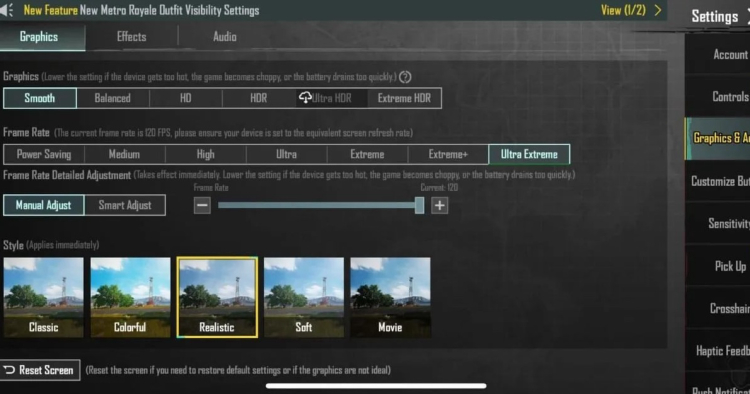
Go to Settings → Graphics & Audio → Frame Rate
Look for options like Extreme or Ultra Extreme.
Keep in mind that some devices may receive support gradually through updates, depending on the region.
Important Considerations
Even on supported devices, performance can vary:
- FPS may drop during intense battles
- Some players prefer 90 FPS for better stability
- Certain devices may require additional optimization or patches
Final Thoughts
120 FPS in PUBG Mobile represents a significant upgrade in gameplay smoothness, but it remains a premium feature for top-tier devices. As hardware continues to improve, wider support is expected—but for now, only the most powerful smartphones can fully take advantage of it.
And if you’re looking for something new to play, take a look at our Top Mobile Games for April 2026 for more recommendations.


 Successfully copied... Thank you for sharing our content!:



5% deposit bonus up to 100 gems

a free Gift Case





EGAMERSW - get 11% Deposit Bonus + Bonus Wheel free spin


EXTRA 10% DEPOSIT BONUS + free 2 spins

3 Free Cases + 100% up to 100 Coins on First Deposit


5 Free Cases, Daily FREE & Welcome Bonuses up to 35%

3 free cases and a 5% bonus added to all cash deposits.

+5% to deposit




Comments