





How to Fix Crashes and Lag in Resident Evil Requiem
Resident Evil Requiem marks a terrifying new chapter in the franchise, delivering impressive visuals and modern performance. However, some players are encountering technical issues such as startup crashes, infinite black screens, “Fatal D3D” errors, FPS drops, and overall lag.
If performance problems are interrupting the horror experience, the following solutions may help restore stability and smooth gameplay.
Update Graphics Drivers
Outdated or incompatible GPU drivers are one of the most common causes of crashes and performance issues.
For AMD Users:
Download and install AMD Software 26.2.2 directly from AMD’s official website. This version includes full support for Resident Evil Requiem and addresses known crash issues.
For NVIDIA Users:
Open the NVIDIA App or GeForce Experience and update to the latest available driver. After installation, restart the PC to apply changes properly.
Updating drivers often resolves Fatal D3D errors, black screens, and startup crashes.
Verify Game Files and Reset Settings

Corrupted or missing game files can cause instability.
To Verify Game Files:
On Steam or Epic Games Launcher:
- Right-click Resident Evil Requiem in your library
- Select Properties
- Go to Local Files
- Click Verify Integrity of Game Files
The launcher will automatically repair any damaged files.
Reset Configuration File:
Locate the config.ini file in the game directory (for example:C:\Program Files\Steam\steamapps\common\RE Requiem).
Delete or rename the file, then relaunch the game. A fresh configuration file will be generated with default safe settings, which can resolve startup crashes and menu glitches.
Lower Graphics Settings
High graphical settings may overload certain systems.
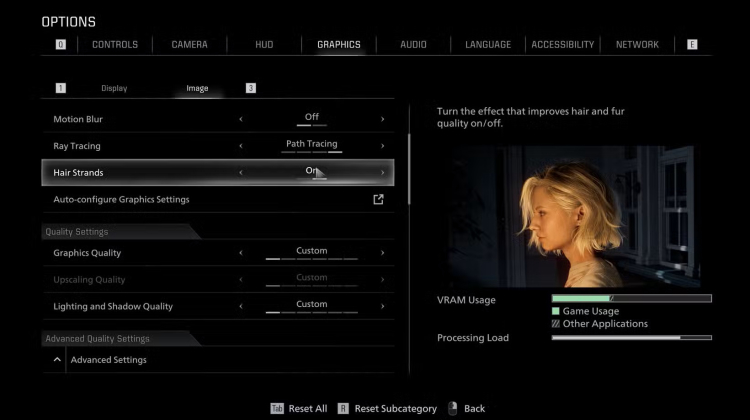
Recommended adjustments:
- Set Textures to “Normal”
- Disable Ray Tracing or Path Tracing
- Cap FPS at 60 (either in-game or through NVIDIA Control Panel)
- Disable DLSS if it causes instability
These changes can significantly improve performance while maintaining visual quality.
Quick System Optimization Tips
- Close background applications such as Discord or web browsers to free up RAM
- Run the game as Administrator (right-click the shortcut)
- Disable overlays in Steam or GeForce Experience
- Increase virtual memory:
- Search for Advanced System Settings
- Under Performance, select Advanced
- Set the pagefile size to approximately 1.5x installed RAM (e.g., 24GB for 16GB RAM)
- Restart the PC to clear temporary performance issues
Additional Troubleshooting Steps
For more persistent problems:
- Experiencing stutters? Disable ReBAR in BIOS or via NVIDIA Inspector (NVIDIA users)
- If the GPU is overclocked, reduce clock speeds by around 100MHz
- Clear Epic Games Launcher cache (Settings > Clear Cache)
- Monitor official patches from Capcom for ongoing fixes
While technical issues can disrupt the experience, these solutions should help restore stability and smooth performance. Once resolved, the journey back into survival horror can continue without interruption.


 Successfully copied... Thank you for sharing our content!:



5% deposit bonus up to 100 gems

a free Gift Case





EGAMERSW - get 11% Deposit Bonus + Bonus Wheel free spin


EXTRA 10% DEPOSIT BONUS + free 2 spins

3 Free Cases + 100% up to 100 Coins on First Deposit


5 Free Cases, Daily FREE & Welcome Bonuses up to 35%

3 free cases and a 5% bonus added to all cash deposits.

+5% to deposit




Comments